
TL;DR
I built an automated n8n workflow that pulls Google Search Console data every week, identifies pages with high impressions but low CTR, and uses an AI agent to generate new, click-worthy title suggestions, dropping everything into a Google Sheet automatically. Setup took around 3 to 4 hours. Ongoing cost: under $1 per month. Time saved: 6-7 hours every single week. AI spots the gaps. You still own the strategy.
Key Takeaways
- n8n is a free, open-source automation tool that connects apps without code
- Low CTR pages, high impressions, few clicks are the fastest SEO wins hiding in plain sight
- The workflow runs on a schedule trigger every Monday, requiring zero manual input after setup
- AI agent + OpenAI GPT analyses your data and writes actionable title recommendations
- Total running cost: approximately $0.01 per workflow run (GPT-4o-mini)
- You do not need to be a developer to build this, just patience and a Google Cloud account
I build AI workflows that take repetitive marketing tasks off your plate. In this reel, I show how I use n8n, a simple automation tool, to connect apps and get hours of manual work done in minutes.
Read more to learn in detail.
The Monday Morning Problem Every SEO Knows
Every Monday, I was doing the same thing.
Log into Google Search Console. Pull last week’s data. Scan for pages with high impressions but low CTR. Copy everything into a spreadsheet. Write up title recommendations. Then actually go and make the changes.
If you do any kind of regular SEO reporting, you know exactly what this loop feels like. The data is always in the same place. The pattern is always the same. The fix is always the same: rewrite the title, tighten the meta, close the gap between what Google is showing your page for and what users actually want to click on.
None of it is difficult. All of it is repetitive. And it was eating 6 to 7 hours of my week. Every. Single. Week.
So I built an n8n workflow to do it for me.
This isn’t theoretical. I built this, ran it, watched it break in two places, fixed it, and now it runs every Monday morning while I’m making coffee. Here’s exactly how to replicate it, including the bits that went wrong.
What Is n8n and Why Should SEO Professionals Care?
n8n is an open-source workflow automation tool that connects apps and data sources without requiring you to write code. Remember flowcharts from school? n8n works the same way: each node is a step, connected in sequence. Drag, drop, configure, done.
For SEO, the value is straightforward. A significant chunk of what we do is repetitive data work: pulling GSC reports, identifying patterns, routing findings to the right place. n8n handles that mechanical layer automatically, on whatever schedule you set, so you can focus on the decisions that actually require expertise.
In short: n8n is not a replacement for SEO thinking. It is the automation layer that removes the grunt work from the job.
What the Workflow Actually Does (Step by Step)
Here is the exact pipeline I built:
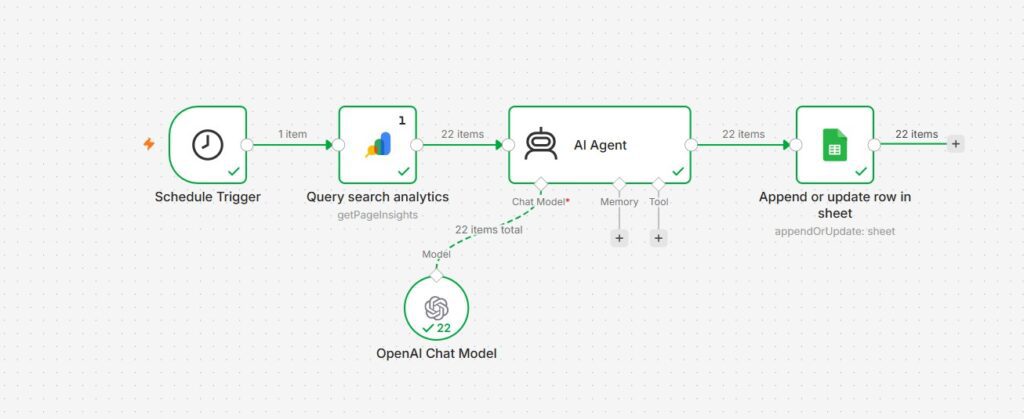
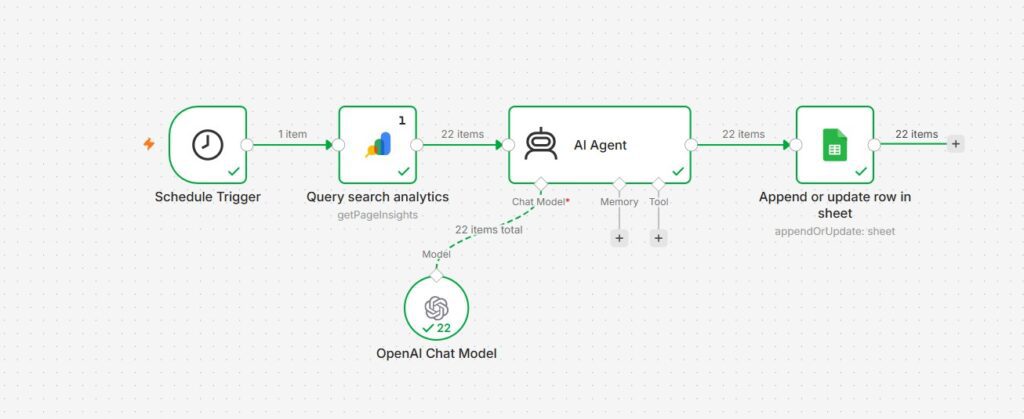
Schedule trigger: every Monday at 9am
↓
Pull last 28 days of data from Google Search Console
(filtered by: Page + Query dimensions)
↓
AI agent analyses the data for:
→ Pages with high impressions, low CTR
→ Current title vs. what the query suggests users want
→ Specific, rewritten title recommendations
↓
Results land in Google Sheets automatically
(Date / Page / Impressions / CTR / Current Title / Recommended Title)
Zero manual work after the initial setup. The sheet is waiting for me on Monday morning with the opportunities already identified and title ideas already drafted. I review, I decide which ones to action, I make the changes. The thinking is mine. The grunt work is automated.
What You Need to Build This (Tools and Cost Breakdown)
One question I get a lot: does this cost a fortune? It does not.
| Tool | What it does | Cost |
|---|---|---|
| n8n | The workflow builder | Free (self-hosted) or ~$20/month on n8n Cloud |
| Google Search Console | Your SEO data source | Free |
| Google Cloud Project | OAuth credentials to connect GSC to n8n | Free |
| OpenAI API (GPT-4o-mini) | The AI that analyses data + generates titles | ~$0.01 per workflow run |
| Google Sheets | Where your results land | Free |
If you self-host n8n on a VPS (a Hetzner or DigitalOcean server costs £4 to £12 per month), the total ongoing cost is the AI API: roughly $0.01 to $0.05 per weekly run. Under $5 per month, even if you run it across multiple sites.
If you use n8n Cloud, add ~$20 per month. Still far cheaper than paying a VA to pull this data manually every week.
How to Build the Workflow: The Honest Step-by-Step Guide
Step 1: Sign up for n8n
Go to n8n.io and start a free 14-day trial. You land on a blank canvas. This is where your workflow lives. It looks daunting for about 30 seconds, and then it makes sense.
Step 2: Set up Google Cloud and enable the Search Console API
This is the step that looks technical but is genuinely just a series of clicks. You need to:
- Create a free Google Cloud project
- Enable the Google Search Console API within that project
- Create OAuth 2.0 credentials (Web application type)
- Copy the Client ID and Client Secret
The key thing n8n gives you is a redirect URL (https://oauth.n8n.cloud/oauth2/callback) that you paste into Google Cloud. This is what lets n8n securely read your GSC data. Once this is done, you never have to touch it again.
Step 3: Add a Schedule Trigger node
This tells n8n when to run the workflow. I set mine to every Monday at 9am. You can set it to any interval you like daily, weekly, fortnightly. With today’s fast pace I suggest weekly.
Step 4: Add the Google Search Console node
Search “Google Search Console” in n8n’s node library. Add it to your canvas. Connect your OAuth credentials (paste in your Client ID and Secret, then sign in with Google).
Configure it to pull the last 28 days of data. Critically: set your dimensions to Page and Query. I skipped this the first time and got only site-level summary data which gave the AI nothing useful to work with. Page + Query gives you row-level data per URL, which is what you need for per-page title recommendations.
Step 5: Add the AI Agent node
This is where the actual intelligence lives. The AI Agent node takes your GSC data and analyses it based on a prompt you write.
Here is roughly what my prompt instructs the AI to do:
- Identify pages where impressions are above a threshold (I use 100 per month) but CTR is below 3%
- Look at which queries are triggering those pages
- Generate a rewritten title for each page that better matches the search intent behind those queries
- Flag quick-win opportunities: pages ranking position 5 to 15 that a better title might push to page 1
The quality of your output is directly linked to the quality of your prompt. Vague prompt = vague recommendations. Specific prompt = actionable output.
Step 6: Connect the AI model (OpenAI GPT)
Add your OpenAI API key. I use GPT-4o-mini — it is fast, cheap (around $0.01 per run), and more than capable for this task.
I tried Google Gemini first because it has a free tier. It hit rate limits immediately when processing 22 pages. OpenAI at $0.01 per run is worth every penny. If you’re on a tight budget, Gemini’s free tier works for smaller sites (under 10 pages). For anything larger, OpenAI at $0.01 per run is the cleaner choice.
Step 7: Add a Google Sheets node
Final step. Connect with Google, point the node at your target spreadsheet, and map the output columns: Date, Page URL, Impressions, CTR, Current Title, AI Recommended Title.
Step 8: Execute the workflow
Click the orange “Execute workflow” button. Watch each node light up green. Then open your Google Sheet.
The first time it worked and I saw AI-generated title recommendations sitting in neat rows with timestamps? I just stared at it for a moment. That still feels surreal to say but it is genuinely what happened.
What Went Wrong (Because Nothing Goes Perfectly in first attempt)
Three things broke on my first attempt. None of them required a developer to fix.
Problem 1: OAuth callback error. My Client ID and Client Secret were pasted into the wrong fields in n8n. Fixed by clearing credentials and re-pasting carefully. Two minutes to resolve.
Problem 2: Gemini rate limits. Switched to OpenAI. Problem gone.
Problem 3: GSC returning site-level data only. This was the biggest one. The AI agent was getting a single summary row for the whole site, not row-by-row page data. Fix: add Page and Query as dimensions in the GSC node settings. Once I did that, the workflow ran exactly as intended.
Every error had a fix. None of them required being a developer. You just have to keep going.
What the Results Actually Look Like
I never hand a client something I haven’t broken myself first. So I ran the workflow on growwdigitaly.com before anything else. After one run with 22 pages in the analysis:
- 6 pages flagged with high impressions (100+) and CTR below 2%
- 4 pages identified as quick-win opportunities (ranking position 6 to 14)
- AI-generated title recommendations for each, mapped to the actual queries triggering those pages
- Everything timestamped and organised in the sheet, ready for me to review
Time to action those 6 pages: about 20 minutes. Time that would have taken me to find them manually, draft alternatives, and organise them: around 2 to 3 hours.
The workflow paid back its entire setup time in the first week.
The Bigger Picture: AI Gives Speed. Human Expertise Gives Direction.
I want to be clear about something, because I think this matters.
This workflow does not replace SEO judgement. The AI does not decide which pages to prioritise. It does not understand your business goals, your audience, or your brand voice. It finds the pattern in the data and surfaces the opportunity. What you do with that opportunity is still entirely yours.
This is the same principle behind the AI content workflows I have built for other clients reducing weeks of manual research and output to minutes of execution. The human layer is still essential. It is just no longer buried under repetitive data work.
What automation does is give you your Monday mornings back. So you can spend them on the work that actually moves things forward.
In Short
An n8n SEO workflow that connects Google Search Console to an AI agent can identify low CTR pages and generate new title recommendations automatically, running on a weekly schedule, at a cost of less than $1 per month. The setup takes 3 to 4 hours. The time saved compounds every single week.
Frequently Asked Questions: n8n SEO Workflow What People Want to Know
Do I need to know how to code to build an n8n SEO workflow?
No. n8n is a drag-and-drop workflow builder. The most technically demanding part is setting up Google Cloud OAuth credentials, which sounds intimidating but is genuinely just a series of clicks and copy-pastes across two browser tabs. No code required. You can use Claude or GPT for step by step process.
How much does it cost to run an n8n SEO workflow?
The AI component (OpenAI GPT-4o-mini) costs approximately $0.01 per workflow run. If you self-host n8n on a VPS, total monthly cost is £4 to £12 for the server plus a few pennies for the AI. If you use n8n Cloud, add ~$20 per month. Either way, it is significantly cheaper than the time cost of doing this manually.
What tools do I need to build this workflow?
You need five things: an n8n account (free to start), Google Search Console access, a Google Cloud project (free) to generate OAuth credentials, an OpenAI API key, and a Google Sheet to receive the output. All of the core tools are free.
Can I use Claude instead of OpenAI for the AI analysis?
Yes. n8n has an Anthropic Chat Model node built in. Replace the OpenAI node with the Anthropic node, add your API key from console.anthropic.com, and select claude-sonnet-4-6 or any other version. Claude’s longer context window can be useful if you are processing a large number of pages in one run.
How long does it take to set up the first time?
Realistically, 3 to 4 hours if you are doing it for the first time and running into the usual credential errors. Once you have done it once, replicating the workflow for another site takes under 30 minutes. The setup time is a one-off cost.
What if I manage multiple client sites?
You would build separate workflows per site, or modify the workflow to loop through multiple GSC properties. This is slightly more advanced but entirely doable in n8n without writing any code, using a split-in-batches node to cycle through a list of sites.
Is n8n better than Zapier or Make for SEO workflows?
For SEO use cases specifically, n8n has an advantage: it is open-source, it connects to any REST API without a premium connector tier, and the pricing scales far better with data volume. A workflow processing thousands of data points per month costs a fraction of what the equivalent Zapier setup would. The trade-off is that the initial setup requires slightly more configuration, but for anything beyond basic automations, n8n is worth it.
Ready to Stop Spending Your Mondays on Manual Reports?
If you are spending hours every week on repetitive SEO data work, that is hours not spent on strategy, content, or the things that actually move the needle.
This is exactly the kind of work I help brands and marketers streamline. If you want to talk through building AI-powered SEO workflows for your business, get in touch.
And if you are still building out your SEO fundamentals alongside the automation layer, my on-page SEO checklist and AI in SEO guide are good places to start.

Shweta Gupta is a UK-based marketer specialising in SEO, content strategy, and AI-assisted marketing workflows. She has experience across SEO, paid media, content optimisation, website management, and digital marketing across various industries.